
Before You Begin:
Make sure you have received an email from your school with instructions for accessing your graduation registration.
The email will include the information you need to get started.
Haven't Received an Email?
-
Check your spam or junk folder.
-
If you still can’t find it, submit a support ticket.
Creating an Account:
-
Open the graduation registration email from your school.
-
Find the link in the email to reset your password.
-
Click the link and follow the instructions to set your password.

-
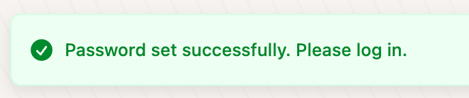
After your password is successfully set, you’ll see a notification in the upper-right corner of the screen that says: “Password set successfully. Please log in.”
-
You’ll then be redirected to the login page.
-
Enter your email address and the password you just created.
Register for your Ceremony:
-
After logging in, you’ll see the ceremony or ceremonies available to you.
-
Click “Register Here” to begin.
-
Review the information that has already been filled in for you.
-
Complete all required fields on the registration form.
-
Review your information carefully before submitting your registration.
-
When everything is correct, click “Submit.”

Important: Check Your Information
Each school sets up its graduation registration differently. Some information may already be filled in for you as provided by your academic institution, while other information will need to be provided by you.
If any pre-filled information is incorrect, contact your school or institution for assistance. [Find Your School’s Graduation Support Contact](Insert link to the article “Find Your School’s Graduation Support Contact”)
What If My Registration Looks Different?
Tassel allows schools to customize their graduation registration forms. As a result, the questions and information requested may vary from school to school.
The registration process is generally the same, but the content of the form may be different for every institution.
If you encounter an issue that isn’t covered in this article, submit a support ticket.