
[Click here for an interactive tutorial]
During graduation registration, you may be asked to submit a selfie to help match you with your graduation photos after the ceremony.
You can take a new selfie using your device's camera or upload an existing photo.
Start Your Graduation Registration
- Log in to your Tassel graduate account.
- Find the graduation ceremony you plan to attend.
- Click Register Here to begin your registration.
- Complete the registration sections until you reach the selfie/photo section.
Note: Registration forms may vary by school, but the photo submission process is the same for all graduates.
Review the Photo Consent Information
- When you reach the photo section, a message will explain how your photo will be used for graduation photo matching.
- Review the information carefully.
- If you agree to the use of your photo, click I Consent to continue.
Take or Upload Your Selfie
You have two options for submitting your photo.
Option 1: Take a New Selfie
- Click Start Capture to use your device's camera.
- Position your face within the on-screen guide.
- Follow the prompts to capture your selfie.
Option 2: Upload an Existing Photo
- Click Upload a Photo Instead.
- Select a photo from your device.
- Follow the prompts to upload your photo.
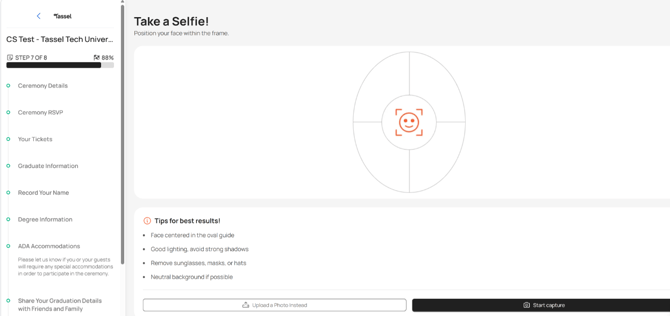
Tips for the Best Results
To help ensure your photo can be used for graduation photo matching:
- Center your face within the on-screen guide.
- Use good lighting and avoid strong shadows.
- Remove sunglasses, masks, or hats.
- Choose a neutral background when possible.
Review and Confirm Your Photo
- Once you've taken or uploaded your photo, a preview will appear.
- Review the photo to make sure you're happy with it.
- Click Use This Photo to confirm your selection.
If you'd like to take a different photo, click Retake and try again.
Complete Your Graduation Registration
- Continue through any remaining registration sections.
- Review your registration details to ensure everything is correct.
- Click Confirm to submit your graduation registration.
You're All Set!
Your selfie has been submitted as part of your graduation registration and will be used to help match you with your graduation photos.
Please note: Photos are not stored. Only a digital thumbprint of each photo is retained for photo-matching purposes. This digital thumbprint is stored for only 60 days after the photos have been added to your account.